
My UbD for Learning Different Multiplication Models in 3rd Grade
I used Wiggins and McTighe’s, Understanding by Design, to create a UbD, Understanding by Design, template specifically for learning different multiplication models in 3rd grade that supports my innovation plan, which focuses on implementing a blended learning environment with a flex model approach using a LMS, like Schoology, project based learning, and guided instruction (2005).
Stage 1: Desired Results
Unit Title: 3rd Grade Multiplication Models
Established Goals:
Students will understand and learn different multiplication models, such as, repeated addition, equal groups, arrays, area models, skip counting, and number lines, and be able to apply them to solve one and two step word problems that are related to real world situations.
Essential Questions:
What are the different ways to multiply?
How can the models support our understanding of multiplication?
Understandings: Students will understand that ….
- There are multiple ways to represent multiplication
- Choosing the right way can make problem solving easier, or more efficient
Skills Gained:
- Students will know how to use different multiplication strategies to multiply, or find the product to a multiplication sentence.
- They will be able to use and explain multiplication strategies that are used to solve word problems that relate to real world situations.
Stage 2: Assessment Evidence
Performance Tasks:
Students will complete a project based learning activity where they use a multiplication model of their choice to solve problems related to the real-world, such as planning a garden, or designing the layout of a grocery store.
Other Evidence:
- Teacher observations during guided instruction
- Quizzes on multiplication facts in Schoology
- Other digital activities in Schoology that assess the understanding of using different multiplication strategies
- Students answer Let’s Discuss Questions as an Exit Ticket, then reflect on their answer choices with the class, or with partner(s) to show their understanding.
Stage 3: Learning Plan
Implement Blended Learning with a Flex Model Approach:
Students will have a combined digital learning environment with a traditional face to face classroom environment where they switch between self paced online lessons in Schoology, work on collaborative, project based activities, and participate in guided instruction with the teacher.
Learning Activities:
Direct Instruction: Teacher guides instruction on different ways to multiply using the various multiplication models, and strategies.
New Digital Lessons: Interactive lessons using Schoology to reinforce the multiplication strategies learned.
Project-based Activities: Students work on projects within a group to apply multiplication strategies to solve real-life scenarios.
Guided small group: Students will receive personalized instruction for extra practice, and guidance from the teacher. Teacher acts as a mentor, or facilitator to assist the students in their learning journey.
Reflection: The UbD Design Process and My Innovation Plan
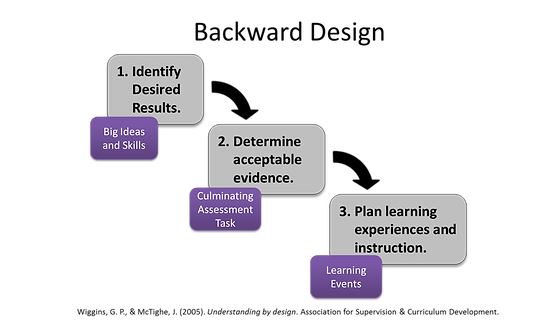
The UbD design process adds more structure to my innovation plan, and uses the outcomes, assessments, and activities, to support personalized and meaningful learning. First, Stage 1 supports the end goals where students will learn much more beyond simple multiplication, like the different ways to multiply, but they will learn how to apply it to more practical, or real life examples. Per my Literature Review, with a flex model approach of blended learning, Schoology gives students a way to learn at their own pace, and including guided instruction will allow the teacher to support students that need extra help with the concepts that they are still struggling with. The UbD template fits into the blended learning environment because it integrates both project based learning and digital learning. This combination is a win-win for all learners because the students will have a chance to demonstrate their learning in creative and fun ways, plus show a deeper understanding of the different multiplication models, and strategies. “Good design, then, is not so much about gaining a few new technical skills as it is about learning to be more thoughtful and specific about other purposes and what they imply” (Wiggins and McTighe, 2005). Students can show their understanding, and progress with what they have learned using these concepts. Teachers will be able to use this to make adjustments, and reteach lessons as needed, so that students can receive feedback in a faster way, and make growth related changes to improve on their mindset, and work ethic. This framework will support a more meaningful, and personalized learning journey for each individual. This process supports beginning with the end in mind, and emphasizing the focus of my innovation plan, and how it supports learners to understand real world applications, while using multiplication models and strategies in numerous ways. “In summary, backward design yields greater coherence among desired results, key performances, and teaching and learning experiences, resulting in better students performance – the purpose of the design” (Wiggins and McTighe, 2005).
Along with my innovation plan, this learning plan will support teaching 3rd grade students the different multiplication models using online lessons in Schoology, small group instruction with the teacher, and project based learning. Applying the WHERETO model by Wiggins and McTighe’s, this acronym highlights elements for instructional planning (2005).
W – Where & Why
- Explain where learners will be using multiplication in real-life, like planning a space or layout.
- Explain why learning various multiplication models is important for real world problems.
H – Hook
- An attention grabber that relates to a real world question, or questions.
- How can we use multiplication models to design a garden
- Students can watch videos, or play fun games in Schoology
E – Explore
- There will be self paced activities in Schoology
- There will be hands-on manipulatives, like counters during small group instruction
R – Rethink
- Students will have the chance to reflect on what they have learned
- Students will receive feedback, then go back to their work, and correct misconceptions
- Students can journal, discuss, and share their understanding with the teacher and peers
E – Evaluate
Students will complete assessments, unit checks, and complete a final project where they apply their understanding of the different multiplication models to the real-world.
T – Tailor
Students will complete lessons that are applicable to their specific needs. Extra help will be provided in small groups to students that are struggling with concepts. And, more advanced problems will be presented to those that are ready to be challenged and show their deeper understanding of the concepts that they have learned using the different multiplication models.
O – Organize
Students will alternate between lessons in Schoology, project work, and hands-on practice to reinforce their learning.
In Summary, the Finks 3 Column Table and UbD Template are two different approaches to designing a learning environment that supports my innovation plan of implementing a blended learning environment using a flex model approach with a LMS, like Schoology, project based learning, and guided instruction.
In Fink’s, Self-Directed Guide to Designing Courses for Significant Learning, a 3 Column Table will focus on matching the learning goals, assessments, and activities, whereas using a UbD Template starts with big learning goals and planning backwards (2003). The first approach is simple, and clear for a quick lesson plan approach, and the latter is used to help students understand important concepts, or ideas in a deeper way. The 3 Column Table supports the flex model approach by connecting the multiplication goals, like understanding arrays to Schoology quizzes, project based tasks, and small group instruction with the teacher. However the UbD Template allows the blended, flex model approach because guided sessions are about a deeper understanding of the different ways to multiply, and there are online activities, or projects that are related to the overall learning goal. Schoology lessons are linked to a personal, learning environment that allows for more real world situations.
They both have their benefits, as well as their limitations. The 3 Column Table allows an easy way for everything to connect, but it doesn’t offer the ability to include much details, for long, or complex units (Finks, 2003). On the other hand, the UbD Template is good for meaningful, or long term planning, but it takes a lot more effort to design or plan out in detail (Wiggins and McTighe, 2005). Therefore, if you are creating short, and quick lessons, then the recommendation is to use the 3 Column Table, but if you are creating deeper, or more detailed unit plans than use the UbD Template. Either way, you can’t go wrong with choosing one of these approaches to creating a better, new culture of learning experience for your students.
References
Fink, L. D. (2003). Self-directed guide to designing courses for significant learning. Jossey-Bass.
Wiggins, G. P., & McTighe, J. (2005). Understanding by Design (2nd ed.). Association For Supervision and Curriculum Development.
 Jackie Bittner M.Ed.